To make sure your first lesson runs smoothly, please take 5–10 minutes to prepare your setup using these instructions. Thank you in advance!


Welcome to the
Online Lesson Setup Guide
WHY? A strong setup = better sound, clearer communication, and a more productive lesson.
Still need to book an intro lesson?
Please download and install the free Zoom app
(not just the browser version):
Using the app (desktop or mobile) ensures better sound quality
and access to music-specific audio settings.
Zoom automatically filters out sustained notes and dynamics unless this setting is enabled — music can get treated like “background noise.”
On Desktop (recommended):
- Open Zoom.
- Click your profile picture → Settings.
- Select Audio.
- Scroll down and click Advanced.
- Turn on:
- ☑ Show in-meeting option to enable Original Sound
- ☑ High fidelity music mode
- ☑ Echo cancellation (Auto)
- ⛔ Disable / reduce noise suppression if available
Then, once you’re inside the meeting:
- Click “Original Sound for Musicians: ON” in the top-left corner.
If it doesn’t say “ON,” it’s not working.
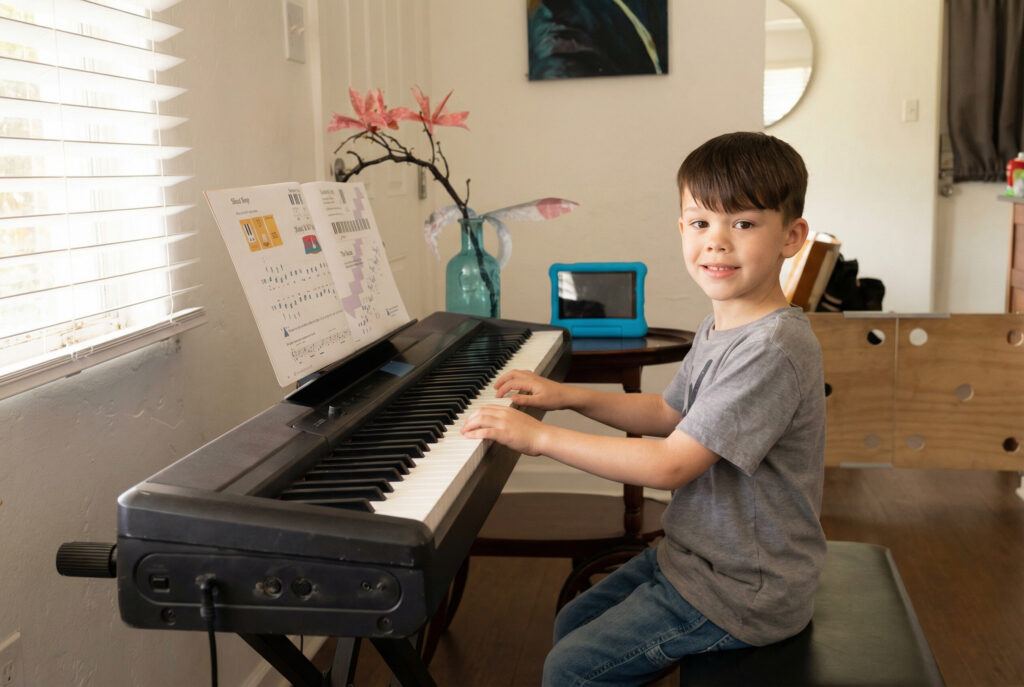
For the best feedback, I need to clearly see:
- Your hands
- The full keyboard
- A bit of your posture and bench position
Recommended Setup:
- Position your camera slightly above and to the side of the keyboard.
- Avoid filming straight on from your face.
- Elevate your laptop using books or a stand if needed.
- Good lighting makes a huge difference.
If you’re unsure, we’ll adjust together at the start of your first lesson.
Here’s a reference example:
Sound Tips for the Best Lesson Experience:
- Use built-in speakers instead of Bluetooth headphones (reduces audio delay).
- Avoid AirPods — they heavily compress musical sound.
- If available, use an external microphone for clearer tone.
- Tune your instrument before the lesson (if applicable).
Please be ready 3–5 minutes early.
This gives us time to:
- ✔ Confirm audio
- ✔ Adjust camera
- ✔ Begin calmly and focused
Lessons begin at the scheduled time.
✔ Quick Checklist Before Your Lesson
-
Zoom downloaded
-
“Original Sound for Musicians” enabled
-
Instrument tuned
-
Camera angle set
-
Quiet space
- Parents are welcome to join!
Why This Matters
Music contains subtle dynamics and tone color. Standard video call settings distort that. These small adjustments allow me to give you professional-level feedback — even online.
- Every detail in preparation can help the overall experience!
Questions before your lesson?